> ## Documentation Index
> Fetch the complete documentation index at: https://help.fanaura.com/llms.txt
> Use this file to discover all available pages before exploring further.
# Fanaura AI (Aura) Overview
> Meet Aura, your AI assistant that knows everything about your music, fans, tours, merch, and campaigns.
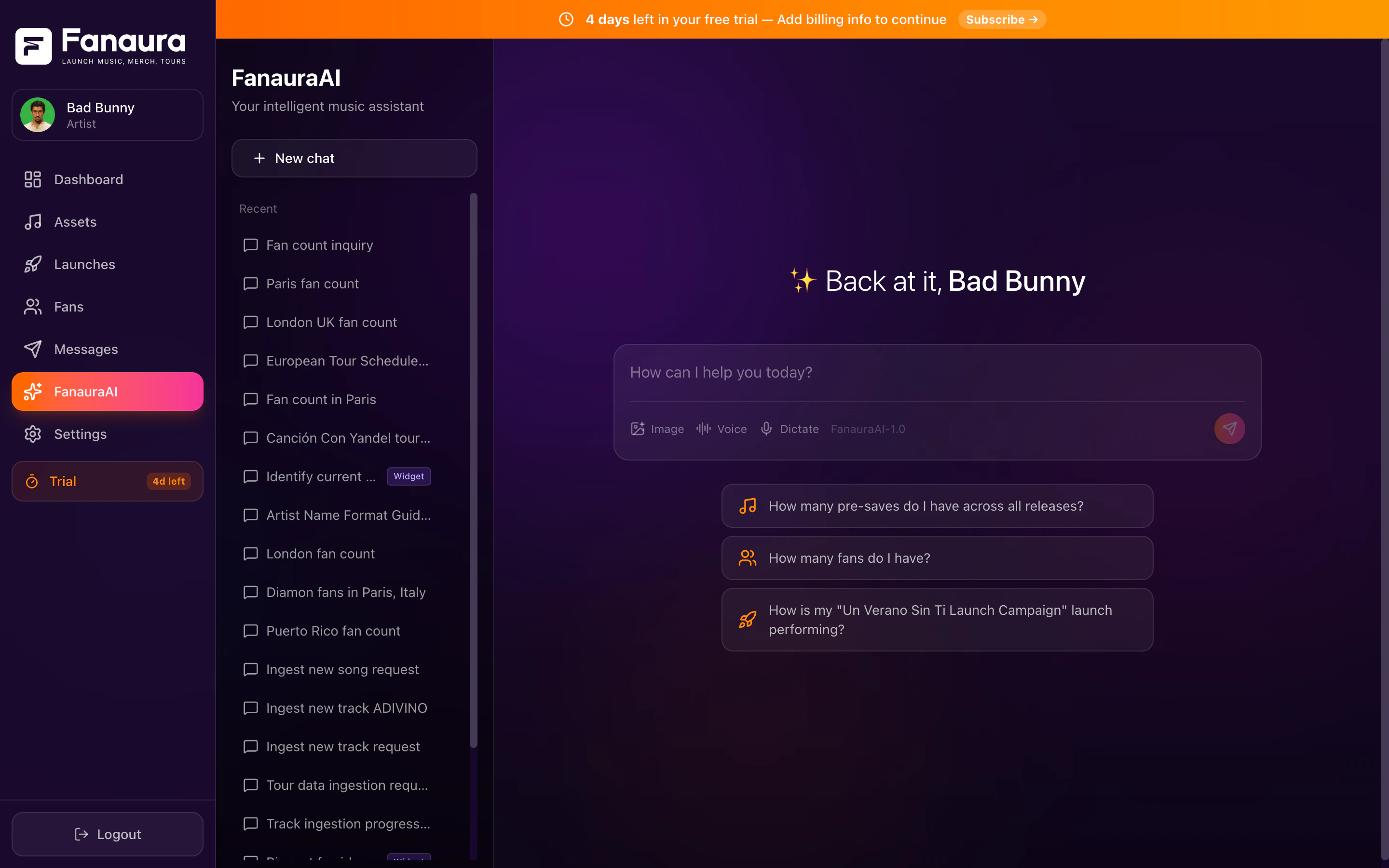
Aura is your personal AI assistant built into Fanaura. Unlike generic chatbots, Aura has full access to your actual artist data -- every fan, every release, every tour date, every campaign metric, every merch product. Ask a question in plain English and get real answers backed by your real data.
 Aura is available on all Fanaura plans. Basic plans include standard AI usage, while Pro and Complete plans include unlimited AI access.
***
## What Makes Aura Special
Most AI assistants are general-purpose. They can write a poem or summarize an article, but they don't know anything about *your* career.
Aura is different. When you ask "How many fans do I have in Texas?", Aura doesn't guess -- it queries your fan database and gives you the exact number. When you ask "How is my new single performing?", it pulls your actual presave counts, conversion rates, and streaming data.
Fans, releases, tours, merch, campaigns, flows, settings -- Aura sees all of it.
Aura can query data, create assets, analyze metrics, find fans, build tours, and more.
Not a snapshot from last week -- your live data right now.
Aura doesn't just answer questions. It can create releases, build tours, update your profile, and more.
***
## The Chat Interface
Aura lives in the **AI** section of your Fanaura dashboard. Here's what you'll find:
### Conversation Area
The main chat area works like any messaging app. Type your question or request in the input field at the bottom and press Enter (or click Send). Aura responds in real time.
* **Natural language** -- ask anything the way you'd ask a friend. No special syntax needed.
* **Streaming responses** -- Aura's answers appear word by word in real time, so you don't have to wait for the full response to load
* **Rich responses** -- Aura doesn't just give you text. Responses can include formatted tables, lists, song cards, fan profiles, event cards, and more.
### Thinking Steps
When Aura is working through a complex question, you can see its reasoning process in real time. A "Thinking..." indicator appears with expandable steps showing:
* What tools Aura is using
* What data it's querying
* How it's arriving at its answer
Toggle the thinking display on or off based on your preference. It's great for understanding what's happening under the hood and building trust in Aura's answers.
### Voice Support
Aura supports both voice input and output:
* **Dictation (Speech-to-Text)** -- click the microphone button and speak your question. Aura transcribes it and responds.
* **Text-to-Speech Playback** -- Aura can read its responses aloud. Great for hands-free use while you're working on other things.
Voice mode is perfect for quick questions when you don't feel like typing, or when you're multitasking in the studio.
***
## Sidebar: Conversation History
The left sidebar shows all your past conversations with Aura:
* **Conversation list** -- every chat you've had, sorted by most recent
* **Search** -- find past conversations by keyword
* **Rename** -- give conversations meaningful names (e.g., "Tour planning March 2026" or "Fan analysis Nashville")
* **Delete** -- remove conversations you no longer need. Deleted conversations are recoverable for 30 days, then permanently removed.
Each conversation maintains its own context, so you can have one thread about tour planning, another about merch analysis, and another about fan growth -- and Aura keeps track of each one independently.
***
## What You Can Do With Aura
Get instant answers about any part of your Fanaura data:
* Fan counts, segments, and demographics
* Release performance and presave metrics
* Tour dates and RSVP numbers
* Campaign analytics and engagement stats
* Merch sales and inventory
* Flow completion rates
Aura can do things on your behalf:
* Create a new music release (with the interactive music ingestion wizard)
* Build an entire tour from pasted routing data
* Update your artist profile and bio
* Add fans to lists
* Look up streaming metadata by ISRC
Ask Aura for analysis and recommendations:
* "Compare my last two releases"
* "What are my top cities by fan count?"
* "Give me a summary of this month's engagement"
* "Which fans are most likely to buy merch?"
### AI Response Cards
When Aura returns specific data, it often presents it as rich, visual cards:
Album artwork, title, artist, presave counts, platform links.
Name, VIP tier badge, location, engagement history.
Venue, date, city, RSVP count, ticket link.
Geographic visualization of fan locations.
These cards make data easy to scan and understand at a glance.
***
## Chat Management
Click the **New Chat** button (or the + icon) in the sidebar to start a fresh conversation. Each new chat starts with a clean slate.
Click the three-dot menu on any conversation in the sidebar and select **Rename**. Give it a descriptive name so you can find it later.
Click the three-dot menu and select **Delete**. The conversation moves to a 30-day recovery period. If you change your mind, you can restore it within that window.
Use the search bar at the top of the sidebar to find past conversations by keyword. This searches conversation titles and message content.
***
## Getting Started with Aura
If this is your first time using Aura, here are some great first questions to try:
1. **"How many fans do I have?"** -- a simple starting point that shows Aura's database access
2. **"Show me my latest release"** -- see a rich song card with all your release data
3. **"What are my top cities?"** -- get a geographic breakdown of your fanbase
4. **"Help me create a new release"** -- experience the interactive music ingestion wizard
For detailed guidance on what to ask and how to get the best results, explore the guides below.
Comprehensive list of queries and actions.
Paste your tour routing and let Aura build it.
Create releases with the interactive wizard.
Get the most out of Aura.
***
## A Note on Privacy
Aura only accesses your data within your Fanaura account. It doesn't share your data with other artists, and your conversations are private to your account. The AI models process your queries securely and don't retain your data for training purposes.
Aura is available on all Fanaura plans. Basic plans include standard AI usage, while Pro and Complete plans include unlimited AI access.
***
## What Makes Aura Special
Most AI assistants are general-purpose. They can write a poem or summarize an article, but they don't know anything about *your* career.
Aura is different. When you ask "How many fans do I have in Texas?", Aura doesn't guess -- it queries your fan database and gives you the exact number. When you ask "How is my new single performing?", it pulls your actual presave counts, conversion rates, and streaming data.
Fans, releases, tours, merch, campaigns, flows, settings -- Aura sees all of it.
Aura can query data, create assets, analyze metrics, find fans, build tours, and more.
Not a snapshot from last week -- your live data right now.
Aura doesn't just answer questions. It can create releases, build tours, update your profile, and more.
***
## The Chat Interface
Aura lives in the **AI** section of your Fanaura dashboard. Here's what you'll find:
### Conversation Area
The main chat area works like any messaging app. Type your question or request in the input field at the bottom and press Enter (or click Send). Aura responds in real time.
* **Natural language** -- ask anything the way you'd ask a friend. No special syntax needed.
* **Streaming responses** -- Aura's answers appear word by word in real time, so you don't have to wait for the full response to load
* **Rich responses** -- Aura doesn't just give you text. Responses can include formatted tables, lists, song cards, fan profiles, event cards, and more.
### Thinking Steps
When Aura is working through a complex question, you can see its reasoning process in real time. A "Thinking..." indicator appears with expandable steps showing:
* What tools Aura is using
* What data it's querying
* How it's arriving at its answer
Toggle the thinking display on or off based on your preference. It's great for understanding what's happening under the hood and building trust in Aura's answers.
### Voice Support
Aura supports both voice input and output:
* **Dictation (Speech-to-Text)** -- click the microphone button and speak your question. Aura transcribes it and responds.
* **Text-to-Speech Playback** -- Aura can read its responses aloud. Great for hands-free use while you're working on other things.
Voice mode is perfect for quick questions when you don't feel like typing, or when you're multitasking in the studio.
***
## Sidebar: Conversation History
The left sidebar shows all your past conversations with Aura:
* **Conversation list** -- every chat you've had, sorted by most recent
* **Search** -- find past conversations by keyword
* **Rename** -- give conversations meaningful names (e.g., "Tour planning March 2026" or "Fan analysis Nashville")
* **Delete** -- remove conversations you no longer need. Deleted conversations are recoverable for 30 days, then permanently removed.
Each conversation maintains its own context, so you can have one thread about tour planning, another about merch analysis, and another about fan growth -- and Aura keeps track of each one independently.
***
## What You Can Do With Aura
Get instant answers about any part of your Fanaura data:
* Fan counts, segments, and demographics
* Release performance and presave metrics
* Tour dates and RSVP numbers
* Campaign analytics and engagement stats
* Merch sales and inventory
* Flow completion rates
Aura can do things on your behalf:
* Create a new music release (with the interactive music ingestion wizard)
* Build an entire tour from pasted routing data
* Update your artist profile and bio
* Add fans to lists
* Look up streaming metadata by ISRC
Ask Aura for analysis and recommendations:
* "Compare my last two releases"
* "What are my top cities by fan count?"
* "Give me a summary of this month's engagement"
* "Which fans are most likely to buy merch?"
### AI Response Cards
When Aura returns specific data, it often presents it as rich, visual cards:
Album artwork, title, artist, presave counts, platform links.
Name, VIP tier badge, location, engagement history.
Venue, date, city, RSVP count, ticket link.
Geographic visualization of fan locations.
These cards make data easy to scan and understand at a glance.
***
## Chat Management
Click the **New Chat** button (or the + icon) in the sidebar to start a fresh conversation. Each new chat starts with a clean slate.
Click the three-dot menu on any conversation in the sidebar and select **Rename**. Give it a descriptive name so you can find it later.
Click the three-dot menu and select **Delete**. The conversation moves to a 30-day recovery period. If you change your mind, you can restore it within that window.
Use the search bar at the top of the sidebar to find past conversations by keyword. This searches conversation titles and message content.
***
## Getting Started with Aura
If this is your first time using Aura, here are some great first questions to try:
1. **"How many fans do I have?"** -- a simple starting point that shows Aura's database access
2. **"Show me my latest release"** -- see a rich song card with all your release data
3. **"What are my top cities?"** -- get a geographic breakdown of your fanbase
4. **"Help me create a new release"** -- experience the interactive music ingestion wizard
For detailed guidance on what to ask and how to get the best results, explore the guides below.
Comprehensive list of queries and actions.
Paste your tour routing and let Aura build it.
Create releases with the interactive wizard.
Get the most out of Aura.
***
## A Note on Privacy
Aura only accesses your data within your Fanaura account. It doesn't share your data with other artists, and your conversations are private to your account. The AI models process your queries securely and don't retain your data for training purposes.